


Wenlin, which was recently updated to version 4.0, is one of the oldest examples of computer software that caters to students of Mandarin. Favored by academics and scholars, the program has been around since the days of Windows 95, and as such, it has built up a solid collection of tools for the language learner.
Devoted users have plenty of reasons to rave about Wenlin.
Looking up vocabulary words is fast compared with thumbing through a traditional printed dictionary. You can decipher Chinese and English documents with greater speed thanks to Wenlin’s built-in text viewer and editor, which has an “instant look-up” feature. And the dictionary entries are top-notch, sourced from the best: John DeFrancis’ ABC Chinese-English and English-Chinese Dictionaries.
Screen Grab: David Chen, Taipei Times
Wenlin doesn’t make a great first impression, though. It takes some getting used to, mostly because of its obtuse user interface, which is stuck in 1995.
When I first opened Wenlin, it wasn’t clear what to do. There is no search bar of the type we’ve been trained to use in the age of Google. All that appears is a white screen divided into two sections and a sidebar with a handful of symbols (which are unintelligible if you don’t read Chinese characters).
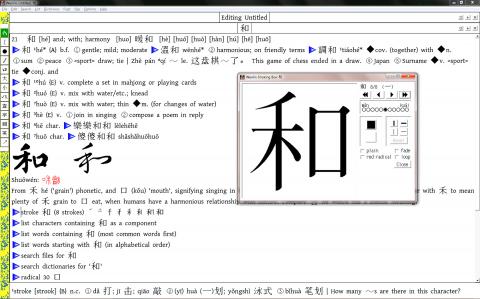
Of course, looks aren’t everything. You’ll find that Wenlin’s big white screen is sort of an all-purpose search box/scratchpad/dictionary. Type in a word or a phrase, in English or Chinese (Hanyu pinyin or Chinese characters), place the cursor over the word, and the definition appears at the bottom on the bottom half of the screen. That’s the aptly named “instant look-up” feature, and it’s very handy for quickly learning the meaning of an unfamiliar word.
Because of this, Wenlin is well suited for reading. Say you have a Word document or a Web page you’re trying to make sense of, whether it’s in Chinese or English. Just copy the text, paste it into Wenlin and move the cursor to whatever unfamiliar word you spot. It worked like a charm with a Chinese article I copied and pasted from the Central News Agency’s Web site.
Yes, you can do the same thing in a Web browser — Firefox and Chrome have free extensions with pop-up dictionaries — but Wenlin’s dictionaries are of much better quality and the software provides a better reading experience. The page is less cluttered as the definitions pop up at the bottom and the experience is smoother as a whole. (I find that using pop-up dictionaries on Chrome and Firefox tends to slow the browser down.) And for any material you paste into Wenlin, you can save it to read again later.
It’s easy to dig deep into the definition of a word with Wenlin, which contains a rich amount of data in both Chinese and English. Say you’re reading a document and you find a word in the instant look-up screen, but you want more detailed information. Simply highlight the word (after choosing the “hand cursor” from the sidebar), and a new window pops up that shows the full dictionary entry.
A typical entry includes examples of the word used in a sentence, helpful for checking context and typical usage, and a long list of other clickable options designed to aid one’s understanding of the language. For instance, you can have Wenlin list the most common instances of a Chinese character. Under the entry for “harmony” or he (和), I clicked on the arrow that says “list words containing” and got these: heping (和平, peace), gonghe (共和, republic), wenhe (溫和, mild and temperate), among hundreds of other compound words.
If Wenlin’s dictionaries are not enough, there’s an arrow you can click that opens your Web browser and gives you a list of links to various online dictionaries for that particular word.
Wenlin can also show you the proper way to write Chinese characters. Click on “stroke” and you get a separate window with an animated demonstration on how to write each character.
What about writing them yourself? Wenlin lets you input characters by drawing with your mouse or a mouse pen — but I found it to be a mixed bag. You have to be spot-on accurate with the stroke order or the character won’t turn up on the screen. I had trouble writing basic characters such as he (和) and wo (我).
This is actually good if you’re a student and want to learn to write properly, but if you’re just trying to look up an unfamiliar character quickly without having to guess the pronunciation or finding the character’s radical, it can be a nuisance. (In this respect, Pleco, which makes Chinese-learning software for mobile devices, does a much better job at making rough guesses when you write a character.)
These are just a few of Wenlin’s many features, which range from the practical to the obscure. Students will appreciate the ability to create flashcards, which are customizable — you can have Wenlin create different types of cards: vocabulary, question and answer or multiple choice. You can also create your own dictionary entries or modify existing ones. Scholars might be happy to know that the new version of Wenlin includes entries from the Shuowen Jiezi (說文解字), an historically important dictionary that dates back to the Han Dynasty.
It takes a bit of time to get used to Wenlin, and I highly recommend going through the well-written “Wenlin tutorial” in the manual. But even when you figure things out, the clunky, awkward layout can still be downright frustrating.
The main problem is that everything looks the same. It’s hard to tell the difference between a document, a dictionary entry or the instant look-up box, especially when they’re squashed together as multiple sections in one large window.
Wenlin gets cluttered very easily, especially if you’re reading a difficult text and looking up a dozen words at once. I found myself doing a lot of clicking and dragging to shrink and expand Wenlin’s windows, and spent a lot of time wishing there was a more elegant way to navigate the program.
An answer to this is to go into the menu and have Wenlin open separate windows every time you click into a dictionary entry or start a new document. It’s surprising that this isn’t the default setting. But the flipside to this is that you could wind up with dozens of separate windows open on your screen. Also, Wenlin’s menu and settings aren’t very intuitive.
On the whole, though, the software’s advantages outweigh the lack of user friendliness. I still found Wenlin to be useful, mostly for perusing Chinese documents and online material copied and pasted into the program. And it’s nice to be able to access the ABC Chinese-English Dictionary on a PC, which pretty much eliminates the need for the print version. If you use an iPad, however, it’s a tougher decision. Pleco offers much of the same functionality and quality, not to mention that it’s more user-friendly and cheaper, costing around US$150 (NT$4,300) for the full package versus Wenlin’s online price of US$179.
But if you’re glued to your laptop or PC and are serious about Chinese studies, Wenlin remains worth the money and time spent learning to live with its quirks.

Taiwan’s English education system is being pulled apart by three opposing forces. Bilingual Nation 2030 pulls students toward English and global communication. Artificial Intelligence (AI) readiness pulls them toward digital judgment, verification and AI-mediated work. But Taiwan’s old exam culture pulls them back toward memorization, grammar drills, timed reading and correct answers. If the education system keeps using old exams to define success, it risks producing graduates who are neither genuinely bilingual nor genuinely AI-ready, but trained for tasks machines can already perform. The first force is Bilingual Nation 2030. Launched in 2018, the policy aimed to “help Taiwan’s workforce connect

It seems every few days one bumps into one of those “real man” comments in which Taiwan is urged to “face reality” or similar, and “make a deal,” with the speaker implying that soon it will be too late. “Deal” advocates always present themselves as having a superior grip on reality, and the manly ability to make the “hard choice.” Their testosterone-laden language often echoes that of Taiwan sellout advocates. Note that such commentary always specifies a process (“make a deal, work with, make progress”), never the end state of what occupation by a violent authoritarian colonialist state will entail. In

June 1 to June 7 "If all Taiwanese were as afraid of dying as you, then what would happen?” Physician Shih Chiang-nan (施江南) reportedly said this to his wife Chen Chiao-tung (陳焦桐) after she urged him to stop intervening on behalf of Taiwanese soldiers stranded overseas after serving in the Japanese Army during World War II. Shih had clashed with high-ranking officials over the issue, engaged in several heated arguments with Taiwan governor-general Chen Yi (陳儀) and allegedly shouted at general Ko Yuan-fen (柯遠芬), chief of staff of the Taiwan Garrison Command, over

“Taiwan’s Opposition Leader Comes to US With a Message Straight Out of Beijing” read a May 31 headline in the Wall Street Journal. Top US administration officials and members of Congress almost certainly read the WSJ, and if there was a bullet point takeaway that people in Washington should absorb ahead of Chinese Nationalist Party (KMT) Chair Cheng Li-wun’s (鄭麗文) arrival in DC on June 9, that headline is it. The last few columns have discussed this very topic, and the timing is not coincidental. While those top officials likely do not read the Taipei Times, judging by the number


 RSS
RSS