


The successor to Windows Vista now has a name: Windows 7.
Although the new operating system is not due to hit store shelves until late next year, Microsoft felt that now was the time not only to unveil the name of the next version of the world’s most-used operating system but, more importantly, the rationale for the abandonment of the “aspirational” naming scheme of recent versions of Windows.
In essence, Microsoft has admitted through various sources that users have come to view Vista as too complicated and too obnoxious. Specifically, Microsoft has taken a lot of heat over Vista’s User Account Control, which relentlessly prompts users with permission dialog boxes — for everything from installing new applications to accessing certain parts of the operating system itself.
Combine that annoyance with the significant computing power needed to make Vista operate as smoothly as Windows XP, and you have a user base that’s been loudly complaining about the direction that Windows has taken. Hence Microsoft’s indication, with the Windows 7 name, that the company is listening — and planning to offer a less intrusive, more streamlined Windows.
But if you use Vista now, you don’t need to wait over a year to get a Vista-like version of Windows that’s leaner, less obnoxious, and indeed even snappier. There are steps you can take whip Vista into shape right now. What you end up with won’t exactly be Windows 7, but it will be a whole lot more livable than the Vista you use now.
TAME USER ACCOUNT CONTROL
UAC is the feature of Vista that users love to hate, and with good reason. It’s responsible for those dialog boxes that read “An unidentified program wants to access your computer” any time that you try to open a file or run a program that could install itself or change files on your computer. The trouble is that 95 percent of the time, you know exactly what you’re doing when this dialog box pops up, and therefore it amounts to just another annoyance on your way to getting something done.
It’s possible to disable UAC altogether, but if you do, you’ll be removing an important security component from Vista, leaving yourself more vulnerable. Instead, you could turn to a new, free tool from Symantec called Norton UAC Tool (www.nortonlabs.com/inthelab/uac.php), which gives you more control over what types of actions UAC prompts you about.
The Norton UAC Tool adds some important options to the standard UAC dialog box. For example, after installing Norton UAC, if you double-click an “exe” file to install a program, UAC will prompt you as usual, but you’ll also have the option to disable that type of prompt in the future by clicking a “Don’t ask me again” check box.
Norton UAC also provides more information than the standard UCA about what’s about to happen as a result of an action you just took. For instance, a UAC prompt that opens after you click some Control Panel applets lets you know that actions you perform might make changes to a protected directory. Again, the Norton UAC offers you the option to disable such prompts in the future.
TONE DOWN AERO
Aero — the Vista interface feature that enables semi-transparent windows — is pretty, but it’s also a major resource hog. It’s so demanding, in fact, that the edition of Vista called Windows Vista Basic, which is designed to run on less powerful machines, doesn’t even include it.
Even if your copy of Vista does, you might want to disable it in order to regain some performance. To do so, right-click a blank area of your desktop, and select Personalize from the pop-up menu. Then click Windows Color and Appearance. From the resulting Appearance Settings dialog box, select Windows Vista Basic from the “Color scheme” list box, and click OK. You’ll still have the look and feel of Vista. But without the Aero transparency effects, your PC will seem more responsive.
You can get another performance bump by disabling some other interface niceties that aren’t necessarily tied to Vista. To do so, open the Vista Start menu, right-click the word Computer, and then select Properties from the pop-up menu. From the resulting System dialog box, click Advanced System Setting from the left-hand pane. The Performance Options dialog opens. From there, deselect those interface options — such as “fade or slide menus into view” — that you can live without. Or simply click the option button labeled “Adjust for best performance,” and click OK.
TURN OFF UNNEEDED FEATURES
You’d be amazed at the number of optional features that Vista starts up by default, slowing down your computer in the process. Some of these features you likely will never need or use.
For instance, do you ever print documents over the Internet? Vista thinks you may want to, so it loads an Internet printing feature. Or do you ever use Windows Meeting Space? If you’re not even sure what it is, you probably don’t use it. But Vista loads drivers for it every time the operating system starts.
To get rid of the Internet printing feature, open Vista’s Control Panel and click Programs and Features. Then click the “Turn features on or off” link in the left-hand pane. The Windows Features dialog box opens. Expand the Print Services section, and remove the check mark from the Internet Printing Client check box. Disable the Windows Meeting Space service in the same way.
And while you’re in the Windows Features dialog box, spend some time looking at the other features that are enabled. Anything with a check mark next to it is. Not using games? Remove the check mark next to Games. Click OK when you’re done, and Windows will spend some time deactivating the features you have de-selected.
DISABLE SERVICES YOU DON’T NEED
Vista comes with a host of system-level services — enhancements tied closely to the operating system — that few people ever use. Yet the existence of these services means that resources are being wasted — and your computer is being slowed.
ReadyBoost, for example, is a service that allows you to use a USB flash drive to give Vista more memory, thereby helping the operating system to do more — theoretically. In practice, few people seem to notice much difference when a flash drive is inserted, and even fewer seem to use ReadyBoost.
Disable it by clicking Start, typing “services,” without the quotation marks, and pressing Enter. In the resulting Services dialog box, find ReadyBoost, and double-click the entry. From the “startup type” drop-down menu, select Disabled, and click OK.
Indexing, too, is a service that is resource-intensive and may either be foregone entirely or replaced by a less resource-intensive indexing application, such as Google Desktop or Copernic Desktop.
To turn off indexing, remain in the Services dialog box, and locate the Windows Search entry. Double-click it. From the “startup type” drop-down list box, select Disabled. Click OK, and you’re done.
Undoubtedly Windows 7 will amount to a lot more than simply the disabling of features, services, and interface elements. But if Microsoft has absorbed anything from the feedback it has received about Windows Vista, it’s that users want less, not more, when it comes to things that get in the way of productivity. Take the steps outlined here to make Vista less intrusive, and you’re likely to be a good bit closer to what Microsoft hopes to give you in Windows 7.
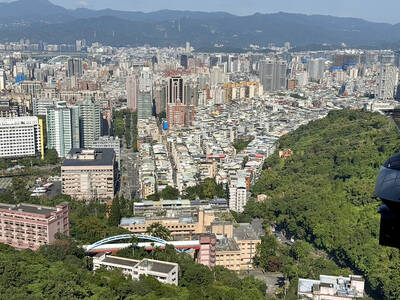
A recent report from the Environmental Management Administration of the Ministry of Environment highlights a perennial problem: illegal dumping of construction waste. In Taoyuan’s Yangmei District (楊梅) and Hsinchu’s Longtan District (龍潭) criminals leased 10,000 square meters of farmland, saying they were going to engage in horticulture. They then accepted between 40,000 and 50,000 cubic meters of construction waste from sites in northern Taiwan, charging less than the going rate for disposal, and dumped the waste concrete, tile, metal and glass onto the leased land. Taoyuan District prosecutors charged 33 individuals from seven companies with numerous violations of the law. This

As mega K-pop group BTS returns to the stage after a hiatus of more than three years, one major market is conspicuously missing from its 12-month world tour: China. The omission of one of the group’s biggest fan bases comes as no surprise. In fact, just the opposite would have been huge news. China has blocked most South Korean entertainment since 2016 under an unofficial ban that also restricts movies and the country’s popular TV dramas. For some Chinese, that means flying to Seoul to see their favorite groups perform — as many were expected to do for three shows opening

What is the importance within the Chinese Nationalist Party (KMT) of the meeting between Xi Jinping (習近平), the leader Chinese Communist Party (CCP), and Cheng Li-wun (鄭麗文), the leader of the KMT? Local media is an excellent guide to determine how important — or unimportant — a news event is to the public. Taiwan has a vast online media ecosystem, and if a news item is gaining traction among readers, editors shift resources in near real time to boost coverage to meet the demand and drive up traffic. Cheng’s China trip is among the top headlines, but by no means
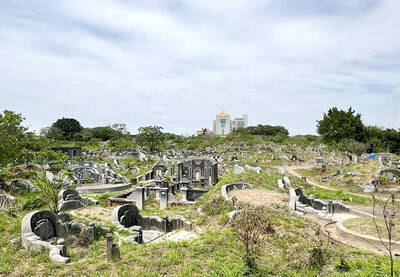
Apr. 13 to Apr. 19 From 17th-century royalty and Presbyterian missionaries to White Terror victims, cultural figures and industrialists, Nanshan Public Cemetery (南山公墓) sprawls across 95 hectares, guarding four centuries of Taiwan’s history. Current estimates show more than 60,000 graves, the earliest dating to 1642. Besides individual tombs, there are also hundreds of family plots, one of which is said to contain around 1,000 remains. As the cemetery occupies valuable land in the heart of Tainan, the government in 2018 began asking families to relocate the graves to make way for development. That


 RSS
RSS