


Are you in control of your smartphone or is it in control of you? Sometimes it is difficult to tell. One minute you might be using FaceTime to chat with loved ones or talking about your favorite TV show on Twitter. Next, you’re stuck in a TikTok “scroll hole” or tapping your 29th e-mail notification of the day and no longer able to focus on anything else.
We often feel like we can’t pull ourselves away from our devices. As various psychologists and Silicon Valley whistleblowers have stated, that is by design.
Many people are making efforts to resist and step away from their smartphones. A survey last year by research company GWI found that people of all ages limit the time they spend on social media — especially younger respondents. Twenty-five per cent of gen Z and 23 percent of millennials said they now look at social apps less to help manage their mental health.
Photo: Reuters
But as recent studies suggest, not all tech time is created equal. Passively scrolling Facebook and comparing your life with other people’s has never been a recipe for happiness. But actively using Twitter for social support can be.
So instead of setting well-intentioned but ultimately unsustainable resolutions or signing up for some kind of extreme “digital detox,” think about changing the settings on some of your apps to make them less of a time sink.
TWITTER: MUTE PEOPLE AND TOPICS
Photo: AFP
Some people might call it canceling, but we prefer the term “curation.” You can improve your Twitter experience by muting anything you’d rather not see, such as fad diet tips, Black Friday offers or movie spoilers. It’s easy to do — and undo. For people, simply tap the three dots on their profile and hit “mute.” You’ll no longer see their tweets, but they won’t know. Do the same for words, phrases, film titles or anything else. Go to “settings,” find “privacy and safety,” tap “mute and block” and then press the “+” sign and add anything you want to blot out.
WHATSAPP: DISABLE READ RECEIPTS
Sending a message and being “left on read” is a huge source of stress for many of us. So is receiving a message and feeling like you have to stop everything you’re doing and reply urgently. Disabling read receipts can quickly reduce these pressures and paranoias. Go to “settings,” then “account,” select “privacy” and toggle read receipts off. Now you won’t see the dreaded blue ticks, and neither will the people you message.
FACEBOOK: NEUTRALIZE YOUR NEWS FEEDS
It has undermined 21st-century democracy but if you can’t face leaving, the next best thing is to delete the Facebook app from your phone and make Facebook a desktop-only experience. By doing this, you can reduce the overwhelming stream of random memes and iffy politics by adding a browser extension, such as “News Feed Eradicator” for Chrome, which hides the news feed and displays an inspiring quote instead.
INSTAGRAM: HIDE YOUR LIKE COUNT
Being a confident, resilient individual, you aren’t concerned with how many “likes” your latest post earns, but you probably know someone who is. Here’s what they should do: remove the like count. On a post, hit the three dots in the top right-hand corner and select “hide like count.” Now, if you click through to who’s liked a photo, only you can see the number of likes. Keen to take it one step further? Hide everyone else’s like counts in “settings,” tap “privacy,” select “posts,” and toggle “hide like and view counts” to on. This makes Instagram feel less like a popularity contest.
YOUTUBE: REMOVE RELATED VIDEOS
Delete the YouTube app from your phone and commit to only watching it on your desktop. Then you can add a browser extension to give you more control. For example, “Improve YouTube” is an extension for Chrome that has a bunch of features to improve your viewing, the best of which hides the “related videos” sidebar. This aspect of YouTube can so often eat up more of your time than you’d intended by sending you down a video rabbit hole.
TIKTOK: SET TIME LIMIT
TikTok can feel like an alternative dimension. You think you’ve spent five minutes watching videos of dogs in hats, when somehow an hour has passed you by. Take control of your viewing by setting a time limit within the app itself. Go to “settings,” “digital wellbeing” and then “screen-time management” to select a time limit of 40, 60, 90 or 120 minutes a day. When your time is up, you’ll need to enter a passcode to keep using TikTok, which should be the nudge you need to go do something else.
NOTIFICATIONS: TAKE A HARD LINE
How often is your eye drawn by a new, and ultimately irrelevant, notification lighting up your smartphone screen? With most apps they are enabled by default. Think carefully: do you really want to be repeatedly jabbed in the brain by assorted social media platforms, ancient acquaintances and pizza delivery companies? Probably not. Instead, decide which ones you really need. Calendar reminders, yes. That someone you’ve not spoken to in 20 years who has “liked” one of your photos, no. Interestingly, a study last year found 89 percent of phone disruptions are caused by a need to check, not notifications. But getting a grip on notifications could help you get a handle on your phone-checking habit — just try to stick with it past a few days. Be strong.
E-MAIL: CHECK IT TWICE A DAY
There are 101 methods that claim to remove the stress from your inbox, from the zero-inbox approach to adding colorful folders or filters. But one straightforward new e-mail habit is: check your e-mails only once — or twice, if you have to — a day. This is a productivity tip long recommended by Tim Ferriss, the author of The 4-Hour Workweek You’ll need to turn off e-mail notifications and set an alarm to remind you to check. Scheduling e-mails will make things easier, staggering replies so your inbox isn’t full again within minutes. You can also create an autoreply explaining your email method and that senders shouldn’t expect an instant response.
LINKEDIN: UNFOLLOW ANNOYING PEOPLE
A useful feature on LinkedIn allows you to unfollow someone so you don’t see their updates. Plenty of people know this feature exists but don’t use it enough. Next time someone humblebrags about their new promotion, Ted talk or number of Substack followers on LinkedIn, consider unfollowing them. It’s easier to reverse than removing or unfriending them, and a good option for colleagues you don’t want to offend — because they won’t see they’ve been unfollowed.
MESSENGER: MAKE YOURSELF UNAVAILABLE
Get rid of the green dot that pops up next to your name in Messenger, showing everyone you know that you’re online. It’s only useful on rare occasions, and the rest of the time this glowing green badge is the online equivalent of having a Post-it stuck to your forehead that says “please talk to me” on it. Head to Messenger, tap your profile, select “active status” and toggle this option off.
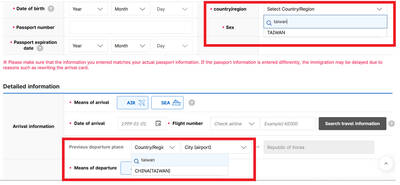
Jason Han says that the e-arrival card spat between South Korea and Taiwan shows that Seoul is signaling adherence to its “one-China” policy, while Taiwan’s response reflects a reciprocal approach. “Attempts to alter the diplomatic status quo often lead to tit-for-tat responses,” the analyst on international affairs tells the Taipei Times, adding that Taiwan may become more cautious in its dealings with South Korea going forward. Taipei has called on Seoul to correct its electronic entry system, which currently lists Taiwan as “China (Taiwan),” warning that reciprocal measures may follow if the wording is not changed before March 31. As of yesterday,

The Portuguese never established a presence on Taiwan, but they must have traded with the indigenous people because later traders reported that the locals referred to parts of deer using Portuguese words. What goods might the Portuguese have offered their indigenous trade partners? Among them must have been slaves, for the Portuguese dealt slaves across Asia. Though we often speak of “Portuguese” ships, imagining them as picturesque vessels manned by pointy-bearded Iberians, in Asia Portuguese shipping between local destinations was crewed by Asian seamen, with a handful of white or Eurasian officers. “Even the great carracks of 1,000-2,000 tons which plied

It’s only half the size of its more famous counterpart in Taipei, but the Botanical Garden of the National Museum of Nature Science (NMNS, 國立自然科學博物館植物園) is surely one of urban Taiwan’s most inviting green spaces. Covering 4.5 hectares immediately northeast of the government-run museum in Taichung’s North District (北區), the garden features more than 700 plant species, many of which are labeled in Chinese but not in English. Since its establishment in 1999, the site’s managers have done their best to replicate a number of native ecosystems, dividing the site into eight areas. The name of the Coral Atoll Zone might

Nuclear power is getting a second look in Southeast Asia as countries prepare to meet surging energy demand as they vie for artificial intelligence-focused data centers. Several Southeast Asian nations are reviving mothballed nuclear plans and setting ambitious targets and nearly half of the region could, if they pursue those goals, have nuclear energy in the 2030s. Even countries without current plans have signaled their interest. Southeast Asia has never produced a single watt of nuclear energy, despite long-held atomic ambitions. But that may soon change as pressure mounts to reduce emissions that contribute to climate change, while meeting growing power needs. The


 RSS
RSS