


A number of things have happened in recent years to make recording digital video an easier and more affordable prospect. Not only have camcorders become less expensive, increased bandwidth and larger computer memory space have made it possible to include digital video in business presentations, on a Web site, and even in e-mails to the family.
Additionally, the range of recorders has evolved in step with the increased number of applications for video. Where once only a small range of suitcase-sized recorders were available, and only for those with suitcases of cash, today's buyer can get a near pocket-sized recorder for... well, a pocket full of cash.
With several good to great models from which to choose, finding which video recorder is right for you is more a matter of knowing what you want to do with it. So rather than look at specific models, we'll look here at some of the things to keep in mind when you start shopping.
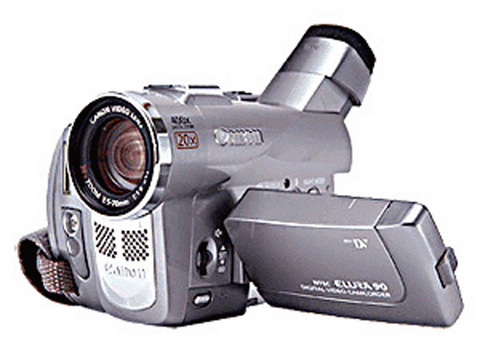
PHOTOS COURTESY OF THE MANUFACTURER
Bells and whistles aside, a camcorder's ability to produce a great image is based in large part on the size and quantity of the charge-coupled devices, or CCDs it employs. CCDs work like the retina of your eye by converting light into information. In the case of a CCD, that information is a digitized image. Budget camcorders will more than likely have a single CCD maybe a quarter inch in size. Professional or so-called prosumer models might have three CCDs of up to one-third inch each.
Just because a recorder has only one CCD doesn't mean it's of poor quality; there are plenty of good machines on the market that have a single, albeit large, CCD.
Though this information usually isn't written on the package nor on the camera case itself, it is singularly important to the machine's ability to produce a good image. If the sales representative you ask doesn't know, he or she isn't going to be of real help to you. Shop elsewhere or, better yet, do your initial research on the Internet before ever heading to the store.
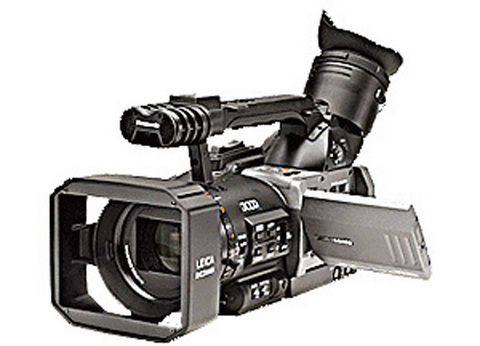
The quantity and size of a camera's CCD(s) will directly effect something else you may have never heard of that is nonetheless crucial to image quality: lux.
Lux is the international standard of luminance and is equal to one lumen per square meter. To which you say, "Right. What's a lumen?" As the answer involves things like steradians, candelas, and a lot of physics flimflam, best to suffice with the rule of thumb: the lower the lux rating, the better the camera can see in the dark.
Filming in dim light may not sound so important but bear in mind that admittedly unscientific studies suggest camcorders are more likely to come out in the evening and after a few drinks than any other time of the day. Recording in these conditions with a camera that has a lux rating of, say, eight, will result in colors that streak and images that ghost -- much the same as you saw it after your few drinks. A camera with a lux rating of two will produce much clearer images and have your friends thinking you're a sober and serious videographer.
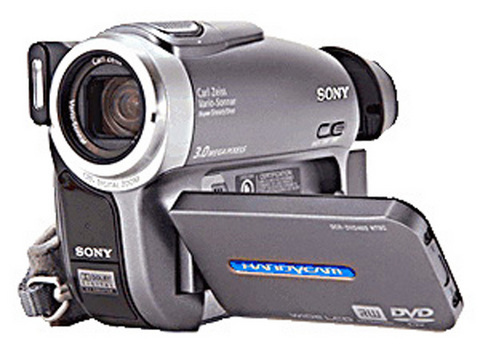
Light sensitivity can also be determined, in part, by looking at the lens' aperture. A maximum aperture of f1.4 or f1.6 is best for low-light conditions.
Another aspect of camcorder technology that is often overlooked by buyers is sound. Often, machines can produce crystal clear images that make people look great but they're incomprehensible when they open their mouth. Background noise, a poor microphone or even motor hum from the camera itself can detract from sound quality. A couple of things to look for are a front-mounted microphone that will pick up the person in the frame, not the mumblings of the person holding the camera, or worse, the sound of them holding it! Also, if a camera has a zoom lens make sure it also has a "zoom" microphone, a common feature on many models -- but not all.
Barring good built-in sound equipment, look to see if your camera has the ability to add pro equipment, such as a hot shoe for a boom microphone or jacks for audio recording or dubbing equipment. And though it might make you look like a geek, it's rather important to check your sound levels with a pair of headphones or earbuds while you're filming, making any necessary adjustments, rather than get home to find your great-looking footage is inaudible.
Once you have your great-looking and great-sounding video "in the can," you'll likely want to move it to the box; either your television or computer. With the majority of today's camcorders shooting to Mini-DV this is easily done. And it's made even easier if your computer has Firewire capability. If it doesn't, getting a Firewire card will be worth your while given that, without it, moving hours of footage to your hard drive could take several more hours of waiting.
(A note on video storage: an increasing number of cameras are employing two types of storage, usually Mini-DV and one or another type of memory stick. This is because most carriers of camcorders want to be able to shoot still images that look as if they were taken with a digital still camera.) Traditionally, they didn't take these types of photos well.
And since many models use memory sticks or flash memory cards of a gigabyte or more, they can also hold several minutes of video that is also easily transferred from the camera to the computer. For this reason, you may want to look for models that are able to record video in more than format. Footage shot to Mini-DV can be several hours long and easily edited with most computer video software, whereas flash memory is great for shooting short video clips in .mpg, .wmv, or Quicktime format for attaching to e-mails or posting on your Web site.

Sept.16 to Sept. 22 The “anti-communist train” with then-president Chiang Kai-shek’s (蔣介石) face plastered on the engine puffed along the “sugar railway” (糖業鐵路) in May 1955, drawing enthusiastic crowds at 103 stops covering nearly 1,200km. An estimated 1.58 million spectators were treated to propaganda films, plays and received free sugar products. By this time, the state-run Taiwan Sugar Corporation (台糖, Taisugar) had managed to connect the previously separate east-west lines established by Japanese-era sugar factories, allowing the anti-communist train to travel easily from Taichung to Pingtung’s Donggang Township (東港). Last Sunday’s feature (Taiwan in Time: The sugar express) covered the inauguration of the

The corruption cases surrounding former Taipei Mayor and Taiwan People’s Party (TPP) head Ko Wen-je (柯文哲) are just one item in the endless cycle of noise and fuss obscuring Taiwan’s deep and urgent structural and social problems. Even the case itself, as James Baron observed in an excellent piece at the Diplomat last week, is only one manifestation of the greater problem of deep-rooted corruption in land development. Last week the government announced a program to permit 25,000 foreign university students, primarily from the Philippines, Indonesia and Malaysia, to work in Taiwan after graduation for 2-4 years. That number is a

This year’s Michelin Gourmand Bib sported 16 new entries in the 126-strong Taiwan directory. The fight for the best braised pork rice and the crispiest scallion pancake painstakingly continued, but what stood out in the lineup this year? Pang Taqueria (胖塔可利亞); Taiwan’s first Michelin-recommended Mexican restaurant. Chef Charles Chen (陳治宇) is a self-confessed Americophile, earning his chef whites at a fine-dining Latin-American fusion restaurant. But what makes this Xinyi (信義) spot stand head and shoulders above Taipei’s existing Mexican offerings? The authenticity. The produce. The care. AUTHENTIC EATS In my time on the island, I have caved too many times to

In a stark demonstration of how award-winning breakthroughs can come from the most unlikely directions, researchers have won an Ig Nobel prize for discovering that mammals can breathe through their anuses. After a series of tests on mice, rats and pigs, Japanese scientists found the animals absorb oxygen delivered through the rectum, work that underpins a clinical trial to see whether the procedure can treat respiratory failure. The team is among 10 recognized in this year’s Ig Nobel awards (see below for more), the irreverent accolades given for achievements that “first make people laugh, and then make them think.” They are not


 RSS
RSS