


Way back in the 1970s, the VCR changed the way we watched TV by allowing us to record our favorite programs and play them back whenever we wished, a industry concept called "time-shif-ting." More recently, we've been introduced to the concept of "place-shifting" where we not only can watch our favorite shows wherever we want, but we no longer have to be in front of our television sets to watch them. Instead, we can stream these programs to any computer equipped with broadband.
Place-shifting is just taking off and can be seen in products such as TiVo-to-Go and various media intensive PCs, as well as with software like Orb. The problem with these is that they are either expensive -- Sony's location-free TV costs US$1,000 -- or difficult to use.
Into the picture comes SlingBox, a device that connects your television to the broadband router in your home and allows you to watch live or recorded television on your computer, whether you have put your computer in the backyard or in Beijing.
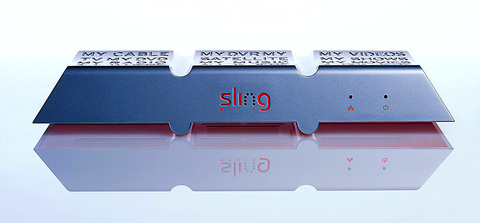
PHOTO COURTESY OF SLINGBOX
Here's how it works: You connect your TV source to the back of the SlingBox and connect the SlingBox to the same DSL router that provides your computer's internet connection. Then download the SlingPlayer software onto your computer. The best-case scenario here is a wireless-equipped laptop, but a computer in your bedroom would work equally well. The SlingPlayer software allows you to view and remotely control your television from your compu-ter. It does so by uploading the television programming to the internet and then streaming it to your computer using the company's compression software.
This SlingStream compression technology is the "secret sauce" of SlingBox's popularity, according to Rich Buchanan, vice president of marketing at Sling Media.
As he explained to Taipei Times, "SlingStream is a bi-directional algorithm that constantly monitors the available bandwidth of your connection and maximizes the video quality for your constantly changing internet bandwidth. It also allows you to instantly interact with your video stream without having to wait for the buffer to clear." What you see on your screen looks and acts like anything you'd watch using Quicktime or Windows Media Player. It can run in the background while you work or be viewed full-screen. It also offers a virtual remote control to operate your TV with your PC.
You can also add TiVo or other DVRs to SlingBox in order to stream any program that you recorded earlier. The application for those of us foreign to Taiwan who may be missing our favorite programming back home is ob-vious: Attach a SlingBox to a television set next time you're back home and you'll have all the local programming there at your fingertips here in Taiwan, or anywhere you take your laptop.
The product was launched on the first of this month and early reviews are glowing. The compression technology is excellent at eliminating choppiness, but still far from DVD quality. The design of the unit itself has its downside, with a unsightly logo of "My TV My DVR My Shows" embossed on the top. But at just 25cm across, 5cm tall and 10cm deep it's small enough to tuck into the television cabinet out of sight. And like your internet router, once you've turned it on, there are few reasons to turn it off.
Another complaint about SlingBox is that it monopolizes the device attached to it. Say attach it to your mom's television set back home, but if you flip the channel here in Taiwan, she'll also be flipped to whatever you change it to. It's also compatible with most but not all cable television boxes. And currently it only works on PCs running Windows XP. SlingPlayer software for Macintosh will be available in the fourth quarter of this year, according to Buchanan, and software for PDAs and many popular cellphones are in the works.
Other complaints among some users is that the device doesn't allow you to record shows onto your computer hard drive and that it only allows a connection to a single computer at a time. It can, however, be shared with anyone anywhere who has downloaded the SlingPlayer software and been given both your password and the unit's ID number.
But most of these complaints have been mitigated by the fact that SlingBox costs just US$250. What's more, there are no monthly service charges or membership fees. The SlingBox hardware is all you need.
Buchanan said that SlingBox will be made available globally during the first half of 2006. Though it's already available online, purchasing it this way isn't advisable for customers outside the US. The current version of the product supports NTSC-M/J only. The second generation will be NTSC/PAL/SECAM compatible and this is the model that will be shipped overseas.
The product is the brainchild of Blake and Jason Krikorian, fans of the San Francisco Giants who grew frustrated at the fact that they couldn't watch their home team struggle to get into the 2002 playoffs while away on business. After conceiving the SlingBox, they raised US$10 million in venture capital and signed partnerships with Texas Instruments for chip production and with Microsoft to help with video compression.
Earlier this year, Forbes magazine named them one of the 25 breakaway companies of 2005.
"Sure, the company may fizzle," Forbes' Fred Vogelstein wrote, "as newbies usually do in the cutthroat consumer electronics game. But with their US$249 device, it's hard to see how the Krikorian brothers don't at least get credit for showing us a new way."

Last week Joseph Nye, the well-known China scholar, wrote on the Australian Strategic Policy Institute’s website about how war over Taiwan might be averted. He noted that years ago he was on a team that met with then-president Chen Shui-bian (陳水扁), “whose previous ‘unofficial’ visit to the US had caused a crisis in which China fired missiles into the sea and the US deployed carriers off the coast of Taiwan.” Yes, that’s right, mighty Chen caused that crisis all by himself. Neither the US nor the People’s Republic of China (PRC) exercised any agency. Nye then nostalgically invoked the comical specter

April 15 to April 21 Yang Kui (楊逵) was horrified as he drove past trucks, oxcarts and trolleys loaded with coffins on his way to Tuntzechiao (屯子腳), which he heard had been completely destroyed. The friend he came to check on was safe, but most residents were suffering in the town hit the hardest by the 7.1-magnitude Hsinchu-Taichung Earthquake on April 21, 1935. It remains the deadliest in Taiwan’s recorded history, claiming around 3,300 lives and injuring nearly 12,000. The disaster completely flattened roughly 18,000 houses and damaged countless more. The social activist and

Over the course of former President Ma Ying-jeou’s (馬英九) 11-day trip to China that included a meeting with Chinese Communist Party (CCP) leader Xi Jinping (習近平) a surprising number of people commented that the former president was now “irrelevant.” Upon reflection, it became apparent that these comments were coming from pro-Taiwan, pan-green supporters and they were expressing what they hoped was the case, rather than the reality. Ma’s ideology is so pro-China (read: deep blue) and controversial that many in his own Chinese Nationalist Party (KMT) hope he retires quickly, or at least refrains from speaking on some subjects. Regardless

Approaching her mid-30s, Xiong Yidan reckons that most of her friends are on to their second or even third babies. But Xiong has more than a dozen. There is Lucky, the street dog from Bangkok who jumped into a taxi with her and never left. There is Sophie and Ben, sibling geese, who honk from morning to night. Boop and Pan, both goats, are romantically involved. Dumpling the hedgehog enjoys a belly rub from time to time. The list goes on. Xiong nurtures her brood from her 8,000 square meter farm in Chiang Dao, a mountainous district in northern Thailand’s


 RSS
RSS