


Anyone who has passed by an electronics store recently has likely noticed the boxes next to the door stacked like small mountains. They are flat-panel computer monitors, and they're priced to make the mountains move.
As recently as last year, liquid crystal displays (LCD) were something you saw only in high-profile places; at the reception desk of hotels and cash wrap of convenience stores. But as the technology has come of age and supply has exceeded demand, the price of the screens has dropped dramatically. An entry-level Acer monitor that might have cost as much as NT$12,000 last year can now be had for as low as NT$8,500. The drop in price has fed a frenzy for all the things that having a flat-panel display can bring.
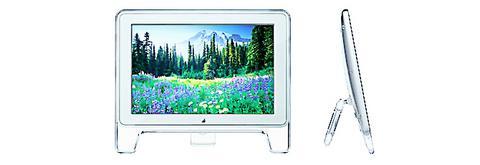
Foremost among these things is the small footprint the monitor has on your desk and the space you can reclaim from getting rid of your old cathode ray tube (CRT) monitor. The depth of the base of the average 15-inch LCD screen is little more than 10cm and the screen only a fraction of that. It seems the only bad thing about losing the large monitors is that flat-panels offer little to no room for perching stuffed animals and trinkets on top.

Another popular reason for trading in CRTs for LCDs is the belief that the latter has an improved picture quality. Actually, this is largely a myth. The old cathode ray tubes still refresh images far faster than today's LCD monitors. The other issue that bugs many LCD owners trying to use their screen for home entertainment is that, as the viewer moves at an angle to the screen, the picture quality can often rapidly deteriorate.
While these issues aren't as problematic as they once were and are improving with each new generation of monitor, given that comparably sized LCDs can cost twice as much as the old cathode ray tubes, many people have opted not to make the change.
Of course, if you are interested in making the change, you'll have a wide variety from which to choose. With hundreds of brands on the market and each of those brands producing several models, it's difficult to pin down only a handful worth considering. As an example, Samsung's monitors are often praised by testers and reviewers, but each new reviewer will cite a different model they like best. As Samsung markets some 20 models that often seem to differ in name only, who's to say which review is right? With that in mind, this review will talk about what to look for in a monitor instead of which monitor to look for.
With regard to image quality, the best number to look for on a monitor's specifications is its pixel response rate. The pixel response rate is the number of times pixels turn on and off and therefore how fast the display can redraw the image on the screen. A lower (and therefore faster) response time is better. This issue is most important for people running game software or watching movies. Many models claim 30 to 40 millisecond (ms) response rates. Better models have 25ms or faster rates. However, this compares with 16ms for most cathode ray tubes.
Speeds are getting faster, however. Hitachi's CML174 brags of a 16ms pixel response time, but it's price tag isn't much to brag about. An easy way to check if the monitor's refresh rate is fast enough for your taste is to simply scroll down a page of text. Most LCD monitors will blur the text so that it's unreadable, whereas a CRT will simply move it down the screen, as is. If it doesn't blur enough to bother you, then don't worry about the pixel response rate.
Another ratio that concerns the display's image quality is the contrast ratio. It is, literally, the difference between black and white. Here again, cathode ray tubes, clunky though they may be, have rates of around 700:1, meaning that blacks will be very black, whites will be very white, and all the colors in between them will be saturated and bright. Good LCD monitors currently carry contrast ratios of around 400:1 to 500:1. The higher the number, the less muddy your picture will be.
The last of the numbers that deal directly with image quality is resolution. Resolution consists of the number of pixels displayed in a horizontal row multiplied by the number of pixels displayed vertically. This generally corresponds with size for LCD monitors: 1024 x 768 for 15-inch displays, 1280 x 1024 for 17-inch monitors and 1600 x 1200 for some 18-inch flat-panels. The higher these numbers on a given monitor, the better the image quality.
Owners of notebooks looking to add a larger monitor to their work or entertainment environment will want to be aware of the fact that the screen in their notebook, although smaller, likely has a better image quality. While it's common to have a notebook with a resolution of 1400 x 1050, you'll need to buy an expensive 20-inch monitor to get a comparable number of pixels on your screen. More pixels means you can see more information on your screen at once before you have to begin scrolling.
The last thing to look at isn't likely to be found in the monitor's specifications. Viewing angle is simply how far to the side of the monitor you can stand before the picture darkens or washes out. Good 15-inch monitors can be seen from as much as a 140o angle before distortion occurs and, with 17-inch monitors, as much as 180o. Be aware that LCDs often won't distort the picture, but will instead change its color when viewed from the side, which can be just as annoying. It must be said here, too, that this isn't a problem with CRTs. Maybe the best thing, then, is to wait for a few more generations and a few more fixes and improvements before making the switch to LCD.

The year was 1991. A Toyota Land Cruiser set out on a 67km journey up the Junda Forest Road (郡大林道) toward an old loggers’ camp, at which point the hikers inside would get out and begin their ascent of Jade Mountain (玉山). Little did they know, they would be the last group of hikers to ever enjoy this shortcut into the mountains. An approaching typhoon soon wiped out the road behind them, trapping the vehicle on the mountain and forever changing the approach to Jade Mountain. THE CONTEMPORARY ROUTE Nowadays, the approach to Jade Mountain from the north side takes an

Last week Joseph Nye, the well-known China scholar, wrote on the Australian Strategic Policy Institute’s website about how war over Taiwan might be averted. He noted that years ago he was on a team that met with then-president Chen Shui-bian (陳水扁), “whose previous ‘unofficial’ visit to the US had caused a crisis in which China fired missiles into the sea and the US deployed carriers off the coast of Taiwan.” Yes, that’s right, mighty Chen caused that crisis all by himself. Neither the US nor the People’s Republic of China (PRC) exercised any agency. Nye then nostalgically invoked the comical specter

Relations between Taiwan and the Czech Republic have flourished in recent years. However, not everyone is pleased about the growing friendship between the two countries. Last month, an incident involving a Chinese diplomat tailing the car of vice president-elect Hsiao Bi-khim (蕭美琴) in Prague, drew public attention to the People’s Republic of China’s (PRC) operations to undermine Taiwan overseas. The trip was not Hsiao’s first visit to the Central European country. It was meant to be low-key, a chance to meet with local academics and politicians, until her police escort noticed a car was tailing her through the Czech capital. The
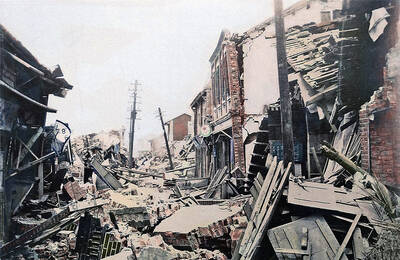
April 15 to April 21 Yang Kui (楊逵) was horrified as he drove past trucks, oxcarts and trolleys loaded with coffins on his way to Tuntzechiao (屯子腳), which he heard had been completely destroyed. The friend he came to check on was safe, but most residents were suffering in the town hit the hardest by the 7.1-magnitude Hsinchu-Taichung Earthquake on April 21, 1935. It remains the deadliest in Taiwan’s recorded history, claiming around 3,300 lives and injuring nearly 12,000. The disaster completely flattened roughly 18,000 houses and damaged countless more. The social activist and


 RSS
RSS